
For families caring for someone with dementia
How to communicate with a dementia patient: calm, familiar, one thing at a time
How to communicate with a dementia patient is less about the words and more about the calm: do not argue with a confused reality, redirect gently, keep the routine steady, and reassure. ExpressAgain's dementia mode puts calm-and-comfort phrases, the daily routine and familiar faces one tap away.
What is already built
Calm and comfort phrases
The Everyday & Familiar library holds where am I and what's happening, feeling unsettled, calm and comfort, and help me remember, in short plain words.
Where it lives: Phrase Library, Everyday & Familiar · Read how it works
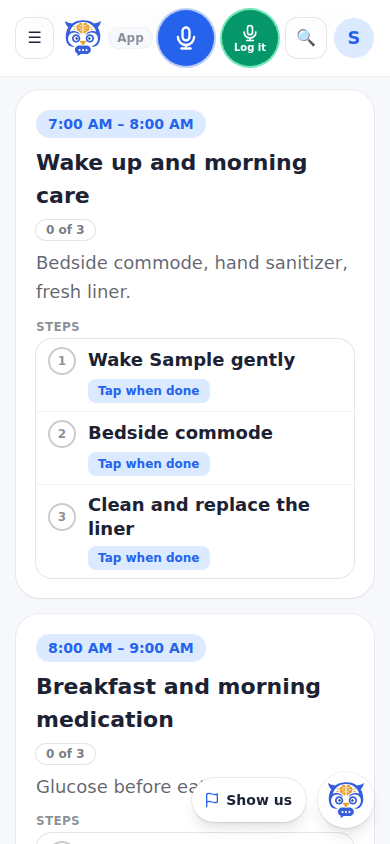
The day plan, as a routine
The patient's real day in time blocks, each with its steps and a how-to video the family records, so every helper runs the morning the same way.
Where it lives: The day plan page · Read how it works
Familiar faces
A photo next to every name on My People and next to every post in the feed, so the patient recognizes the face.
Where it lives: My People page · Read how it works
Trained dementia care on the Marketplace
The right professional does not argue with a confused reality; they redirect gently, keep routines steady, and take every moment of confusion as a moment to reassure.
Where it lives: Marketplace, Alzheimer's & Dementia Care · Read how it works
Today: calm phrases the person taps, a written routine every helper follows, familiar faces, and dementia care on the Marketplace.
How it works
Create a free account: your name, email, a password and who the app is for (yourself, someone you care for, or a patient).
The guided setup takes four short steps: who the app is for and the condition mode, text and button sizes, a voice and the first people, then a review.
Tap any phrase on Communicate to say it out loud; invite family with a personal link and give each clinician or professional a code from the IDC Care Team page.
Questions people ask
Is it free to start?
Yes. Free is where everyone starts, and communicating is never behind a paywall: tap to speak, the phrase boards, the sentence builder, Letters, the Phrase Library, lessons, Games and Play, the emergency screen, the Emergency Plan Card and the built-in voice. Free also invites 2 family members to the Family and Friends Feed. The Pricing page shows the plans side by side.
What happens after I sign up?
Sign up asks for your name, email and a password, and who the app is for. Then the guided setup takes four short steps: who the app is for and the condition mode, text and button sizes, a voice and the first people, then a review. Entering the patient's name and date of birth pins the two phrases hospitals ask for constantly.
How do I keep the routine the same with different helpers?
Write it once in the day plan; whoever is on shift ticks each step and the log keeps who did it and when. The start-of-shift and end-of-shift checklists the family writes do the rest.
Can I find someone with dementia training?
Alzheimer's and Dementia Care is a Marketplace service: search home care agencies that offer it by ZIP code, and an agency's profile shows the conditions it has experience with.