
For families looking for help at home
Live-in care at home, built as a real shift schedule
Live-in care at home is one of the blocks a care request can tick, 24/7 or live-in, so only professionals who work that way are matched. ExpressAgain then builds the coverage as a weekly schedule with recurring slots, open shifts and clean handoffs, so three in the morning is covered by plan, not by luck.
What is already built
Around-the-Clock Care
24/7 or overnight coverage built as a real shift schedule, start- and end-of-shift checklists with clean handoffs, night-time safety, a team that shares one care plan with no gaps between shifts, and escalation to the family and the care team when something changes.
Where it lives: Marketplace, Around-the-Clock Care · Read how it works
The weekly schedule
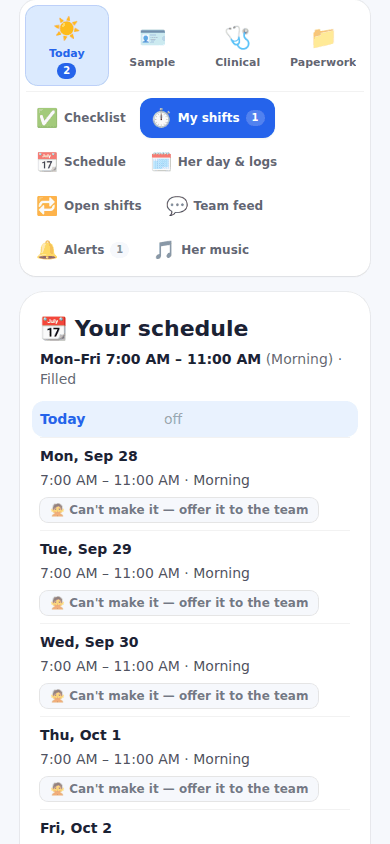
Recurring slots per person kept as versions with Change from a date, End this shift, Offer to and Schedule history, one-off shifts, and open shifts to offer; Can't make it releases a shift as an offer another team member can claim from Open shifts.
Where it lives: Home Team management, Weekly schedule · Read how it works
The app during a visit
Clock in, tick the start-of-shift list, follow the day step by step, log doses, readings and personal care (a shower, a wash-up, moving around and how the patient moved), tick the end-of-shift list, clock out. Every entry is saved under the professional's name.
Where it lives: The care-team dashboard, Today · Read how it works
The Home Care Team Plan
The 25 sections of the home care team plan on one page, filled from what the family already keeps in the app; the Weekly Coverage Plan shows who works when this week from the weekly schedule, a slot nobody holds reads Open, nobody yet, and every section prints.
Where it lives: Home Care Team Plan page · Read how it works
Today: a live-in block on the request, a weekly schedule with open shifts, handoff checklists and the coverage plan that shows the gaps.
How it works
Post a care request on the Marketplace: your name, email and phone, the ZIP code where care happens, the type of care, what you will pay, the tasks, a credential if one is needed, when, and a few lines about the patient. Sending it creates your free ExpressAgain account so you can track it.
The professionals near you whose rate for your distance, tasks, credential and travel limit fit are matched the moment the request is saved and emailed at once; each answer comes straight to your inbox with the professional's message and contact details.
Choose the person: send the questionnaire from Find a team member, agree the rate, sign the agreement, and the professional joins My Home Team and works from the family's shared care plan, the day plan and the shift checklists.
Questions people ask
Is it free to start?
Yes. There is no charge to post a care request, and sending it creates your free ExpressAgain account so you can track it under Your care requests on Marketplace Home. Free is where everyone starts, the Pricing page shows the plans side by side, and no price is written on this page.
What happens after I post a request?
The request goes live on the Open Care Requests board with your name masked, and the professionals in your ZIP area who match are emailed at once; the thank-you shows who matched right now and names the account it created. Each answer arrives in your inbox with the professional's message and contact details, and Your care requests on Marketplace Home lists every request with how many answered.
What if the live-in professional cannot make a shift?
Can't make it releases the shift as an offer the rest of the team can claim from Open shifts, the family can post open shifts itself, and the Weekly Coverage Plan shows the slot as Open, nobody yet until someone holds it.
Does the pay handle nights that cross midnight?
A shift that crosses midnight stays one row under the day it started; a shift that runs past the end of the pay period is split at that midnight, breaks count where they happened, overtime counts each week's own hours, and the printed invoice shows the same days.