The public site has a page for aphasia, More about aphasia, linked from the site's footer. Under it, Explore Aphasia lists eight plain-language pages, each answering one question: What is aphasia? (the meaning and the medical definition), Aphasia vs. dysphasia, Types of aphasia, Aphasia causes, Sudden difficulty finding words, Can aphasia be cured?, Can you be born with aphasia?, and Sick and can't talk (what it could mean).
Each page answers its question in the first paragraph, then explains in short sections, with Common questions you open one at a time, links to the related pages and the blog, its Sources (the National Institute on Deafness and Other Communication Disorders, the American Speech-Language-Hearing Association, the National Aphasia Association, the American Stroke Association, the CDC, MedlinePlus, Mayo Clinic and Cleveland Clinic, each linking that organization's own page) and the day it was last reviewed. Explore aphasia, at the side (at the bottom on a phone), moves between the pages.
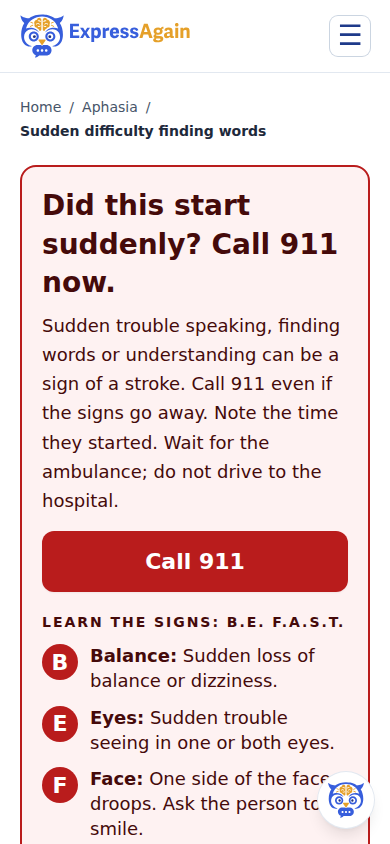
Where a symptom can start suddenly (Aphasia causes, Sudden difficulty finding words, and Sick and can't talk), the page opens with the B.E. F.A.S.T. stroke signs and a Call 911 button; the other pages carry a one-line note to call 911 at the top. The pages are general information, not medical advice and never a diagnosis.
Each page also carries See how ExpressAgain works for aphasia, which points calmly to how the app helps a person with aphasia be understood, and From the blog. Inside the app, the Aphasia and Stroke mode, Learn and Practice Out Loud are where that work happens.
Step by step
- 1Open More about aphasia from the site's footer, or go to expressagain.com/aphasia.
- 2Under Explore Aphasia, pick a question, for example Types of aphasia.
- 3Read the short answer at the top, then the sections; open a question under Common questions.
- 4Use Explore aphasia to move to the next page, and the Sources list to read each organization's own page.
What it looks like
Screens at phone width, with sample names — no real person’s information.