ExpressAgain
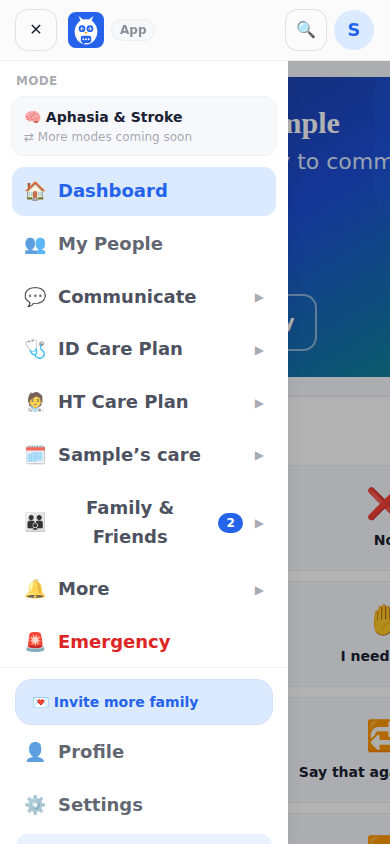
The menu on the left (the three lines on a phone) has two links on top — Dashboard and My People — then groups you can open and close: Communicate; ID Care Plan; HT Care Plan (Home Team Care Plan); the group named after the patient, for example Debbie's care; Family and Friends; and More (Notifications, Help Center). Emergency is always the last link, in red. Profile and Settings sit at the bottom.
Each group holds the pages of that world. ID Care Plan is the clinical picture: Status Board, Care Team, IDC Team feed, Health Tracking, Prescriptions, Doctor's Records (only when that feature is switched on) and Reports. HT Care Plan is the hiring and managing side: Marketplace Home, Find a team member, My Home Team, Agencies and Quotes, Agencies and Staff, Home Team agreements, Home Team management and Home Team reports. The patient's group holds her Day, Visit Flow Sheet, Coming Home, Supplies, Menu and Kitchen, Eating Out, Emergency Plan Card, Her Schedule, Visit Planning, Visitors, My Vault and Bills and Payments.
You can close every group, including the one you are in, and the app remembers your choice on that device. A linked family member or friend sees a shorter flat menu with only the circle pages they can use.
What it looks like
Screens at phone width, with sample names — no real person’s information.