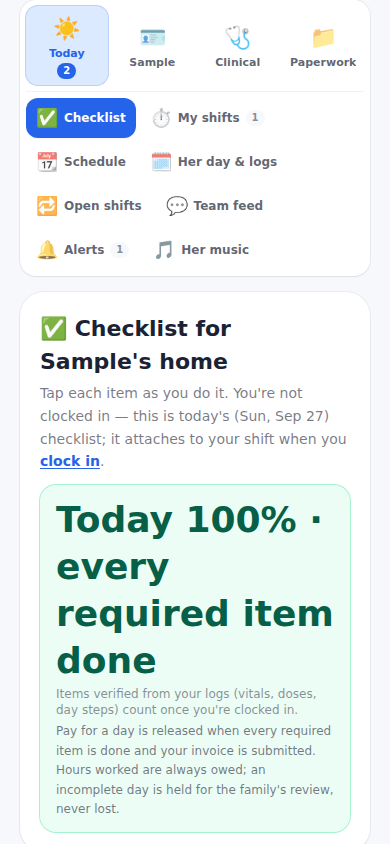
The care-team dashboard: four doors

Today, About the patient, Clinical and My paperwork — only the open door's tabs show, and your discipline decides which tabs exist.

1 min readUpdated For: clinician, professional

The dashboard opens with Welcome to the patient's care team and your name, the last-updated line, your shift today, and the items needing attention. The tabs live behind four doors. Today: Checklist, My shifts, Schedule, Her day and logs, Open shifts (aides and nurses), Team feed, Alerts, Her music. About the patient: Patient info, Medications, Care targets and instructions, Pharmacies, Doctor's records (when switched on), Reports, Health Tracking, Visit flow sheet, Emergency card. Clinical: Assign exercise (SLP, PT and OT only), the team's assignments, Home recommendations, Notes for her and the caregivers. My paperwork: My agreement, Documents, Skills, My profile, and Getting started once it is finished.

While the Getting started checklist is open it is pinned above the doors and is the landing tab. Your discipline comes from the invite code — an SLP invite can only ever be an SLP — and every login ends with My profile: name, email, password, and My record, the same record the family sees, with a row each for agreement, documents, entry code, how I get paid and getting started.

What it looks like

Screens at phone width, with sample names — no real person’s information.
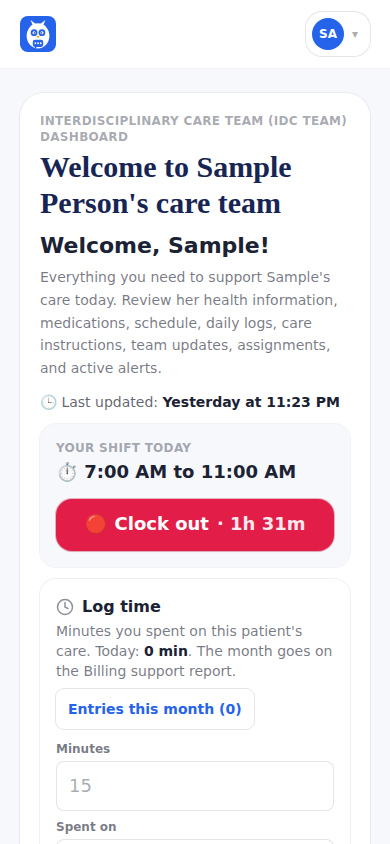
The care-team dashboard as a home health aide: the welcome, your shift today and the clock.
The four doors — Today, About the patient, Clinical, My paperwork — and the Today tabs.
Was this helpful, or is something out of date? Write to support@expressagain.com and a real person will fix it.

Still need help?

A real person reads every message. Family members are always welcome to write on a patient’s behalf.

Email

support@expressagain.com

We typically reply within one to two business days.

Contact page

Text and in-app

Reply HELP to any of our texts for assistance, STOP to unsubscribe.

Signed in? Send a request from the Help Center inbox and see its status there.

Help Center inbox

If this is an emergency or someone is in immediate danger, call 911 or your local emergency number. This Help Center is for using the app, not for medical advice.