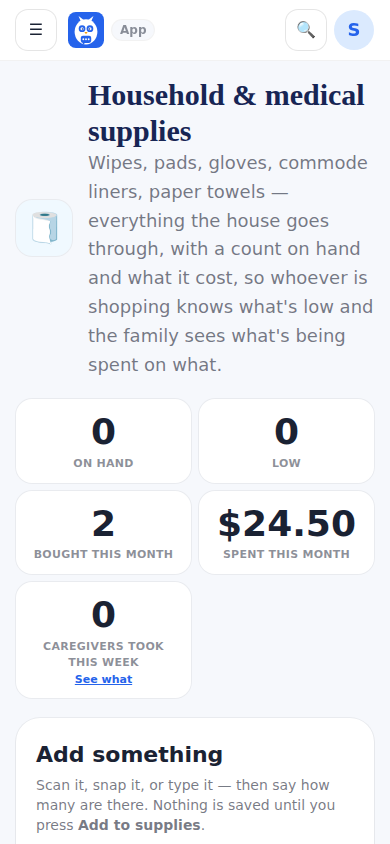
Supplies is the kitchen inventory's machinery pointed at the rest of the house: how many packs of cleaning wipes, alcohol pads, bedside commode liners, paper towels. Scan a barcode, take a picture or type it in; every path ends on one confirm card that asks how many. Rows carry a price per pack and pieces in each pack, and the strip shows Bought and Spent this month. A Low or Out pill adds the item to the grocery list with one tap.
Amazon-only labels and barcodes no public database knows are handled honestly: the app says so, lets you add the item by hand or by picture, and remembers that label for next time.
We're out of this is a scan mode next to Scan a barcode. Scan the empty pack: when it is in the supplies, its count goes to 0 and it goes on the grocery list. A barcode nothing in the house has opens a box to name it and put it on the list. The ordinary Scan a barcode still adds stock.
Professionals on the patient's care team (the care-team dashboard, behind the door named after the patient) use the same page. On each row they have Used one, which takes one off the count under their name, and Running low, which puts the item straight on the grocery list as Added by Jewel; the row's ⋯ has We're out. Suggest something new, at the top of the list, is for something the house does not have yet: a name, a scan or a picture, how many and a short note such as Need larger gloves. That is a suggestion, not a purchase: it waits on the Suggestions tab for the family, who taps Add to list or No thanks (with an optional reason), and the professional sees Suggested · waiting for the family, Added to the list or Not this time. Professionals never add items, change prices, restock, remove or answer suggestions. The family hears about it in the app's Notifications and with at most one phone notification every 30 minutes, such as Jewel added 2 items to the shopping list and suggested 1 new item; never by email. Friends and the agency office never see the page.
What professionals used: when something is used by a professional rather than for the patient, choose A professional under Who's taking it? before the minus. The strip's Used by professionals this week tile and the What professionals used card list it by person and by item; see What professionals used.
Step by step
- 1Open Supplies. A professional opens it from the care-team dashboard, behind the door named after the patient.
- 2When a pack is used up, tap Used one (the family's minus) on its row.
- 3When something is running low, tap Running low (a professional) or the Low pill (the family): it goes on the grocery list.
- 4To mark something empty, tap We're out of this and scan the pack, or a professional taps ⋯ and We're out on the row.
- 5For something the house does not have, a professional taps Suggest something new, fills in the name and a note, and taps Send to the family.
- 6The family opens the Suggestions tab and taps Add to list or No thanks on each one.
What it looks like
Screens at phone width, with sample names — no real person’s information.