
No sound when tapping a phrase

Check the device volume and mute switch first, then Test my voice in Settings.

1 min readUpdated For: patient, family

First check the device itself: turn the volume up with the hardware buttons and make sure the mute or silent switch is off — that is the cause more often than anything else. Then open Settings, Voice and Accessibility, and tap Test my voice. If you hear it there, sound is working and the phrase you tapped will speak too. Some browsers wait for a first tap on the page before they will play any sound; tap once anywhere and try again.

What it looks like

Screens at phone width, with sample names — no real person’s information.
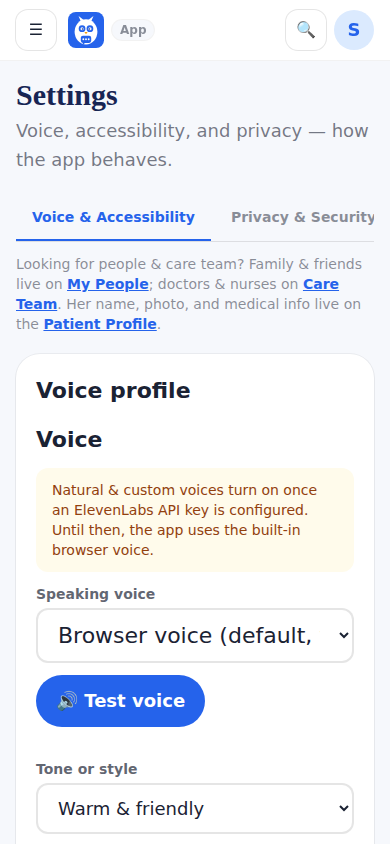
Settings, where Test my voice lives under Voice and Accessibility.
Was this helpful, or is something out of date? Write to support@expressagain.com and a real person will fix it.

Still need help?

A real person reads every message. Family members are always welcome to write on a patient’s behalf.

Email

support@expressagain.com

We typically reply within one to two business days.

Contact page

Text and in-app

Reply HELP to any of our texts for assistance, STOP to unsubscribe.

Signed in? Send a request from the Help Center inbox and see its status there.

Help Center inbox

If this is an emergency or someone is in immediate danger, call 911 or your local emergency number. This Help Center is for using the app, not for medical advice.