
Billing support: time logs and reading counts for your biller

Log time on the dashboard; the monthly report formats time entries, reading counts and plain documentation checks for care-management billing — it never picks a code.

1 min readUpdated For: clinician, organization

Time logs and reading counts formatted for care-management billing so their biller can submit without rework. A Log time card sits under the clock on the dashboard: minutes, activity, an optional note. The Billing support tile under Reports shows the month — the staff table (minutes per clinician), the readings and activity table, the discharge block when one is on record, and a list of plain checks answered yes, no or not applicable — with Print and two CSVs: one row per time entry with a total, and the monthly summary.

Scope: documentation support for chronic care management, transitional care management and advanced primary care management. It never chooses, suggests or names a billing code, and it is not remote patient monitoring — the readings are typed in, not device-transmitted. The practice's coder decides the codes from the export.

What it looks like

Screens at phone width, with sample names — no real person’s information.
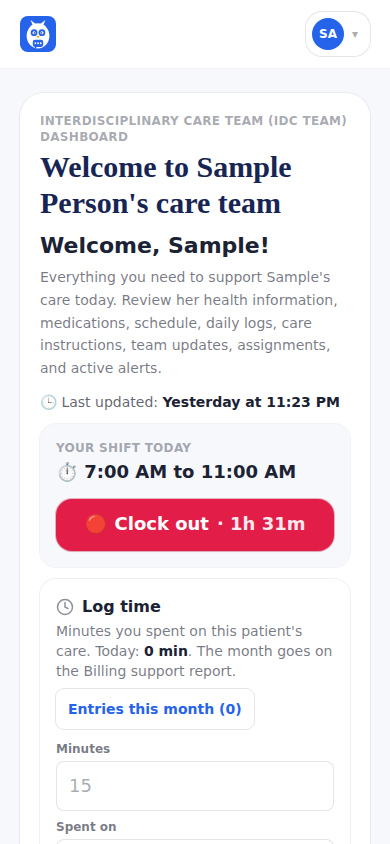
The Log time card under the clock on the care-team dashboard.
Was this helpful, or is something out of date? Write to support@expressagain.com and a real person will fix it.

Still need help?

A real person reads every message. Family members are always welcome to write on a patient’s behalf.

Email

support@expressagain.com

We typically reply within one to two business days.

Contact page

Text and in-app

Reply HELP to any of our texts for assistance, STOP to unsubscribe.

Signed in? Send a request from the Help Center inbox and see its status there.

Help Center inbox

If this is an emergency or someone is in immediate danger, call 911 or your local emergency number. This Help Center is for using the app, not for medical advice.