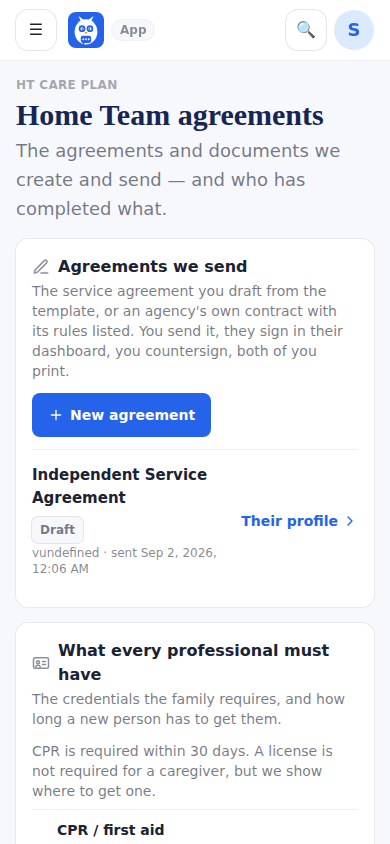
Compliance & Credentials is the family's library of the documents we create and send out. To start or open an agreement with one person, use the Agreements tab of their profile on My Care Team: the person is already chosen and you never leave the profile. Agreements we send: New agreement starts the Caregiver Services Agreement for a professional you hire directly, on real paper and in the founder's own words (see Agreements on real paper); Other agreements offers a Marketplace hire's agreement (Agreement 2, 3 or 4 with Addenda A, D and E) and the Simple caregiver agreement, the plain-English one whose sections you can edit. Upload an agency's contract (PDF) keeps an agency's own contract with its rules listed. What every professional must have: the credential policy (CPR within 30 days, a license if you require one, TB, training) and the skills checklist templates you can assign. Who has completed what: one row per professional with Agreement, W-9, CPR, License, TB and Skills checklist as status pills; the name opens their profile.
A document a person filled out lives on their profile, not here. Skills checklists are validated by the family or their nurse: the professional's self-ratings sit beside each item, the evaluator rates and signs, and the result is printable. Agreements signed before October 9 keep the text and the look they were signed with.
An agreement with one professional (from the profile)
- 1Open My Care Team, tap Open profile on the person, then the Agreements tab.
- 2Tap New agreement for (their first name), or Other kinds of agreement and Start.
- 3Fill it in, tap Send for signature, and stay on the tab.
- 4When they have signed, tap Open and sign and sign for the family; Back to (their first name) returns to the list.
The library (every agreement for the whole home team)
- 1Open the menu, then HCT Management, then Compliance & Credentials.
- 2Read Agreements we send; each row names the professional and opens their profile.
- 3Set the credential policy and the skills checklists under What every professional must have.
- 4Read Who has completed what; tap a name to open that person's Documents tab.
What it looks like
Screens at phone width, with sample names — no real person’s information.