
The professional's profile: one record for everything

About, name and contact, house entry, agreements, documents, hours and pay, regular schedule, getting started and manage — all on one page per person.

1 min readUpdated For: family

Every professional has one profile. The header shows the photo, the name with the credential, the role tag, category and engagement, city and state only, and when they joined; then a stats card (shifts completed, hours this month, credentials on file); then Call, Email and Documents as icon actions. Sticky section tabs lead to About (what the person wrote about themselves), Name and contact, House entry, Agreements, Documents, Hours and pay, Regular schedule, Getting started and Manage.

The Social Security or EIN number never comes down with the record. A deliberate Reveal is logged on the server and the number leaves the screen after twenty seconds, like the door code. The owner can also type a number in by hand when the person has not filled a W-9 in the app.

What it looks like

Screens at phone width, with sample names — no real person’s information.
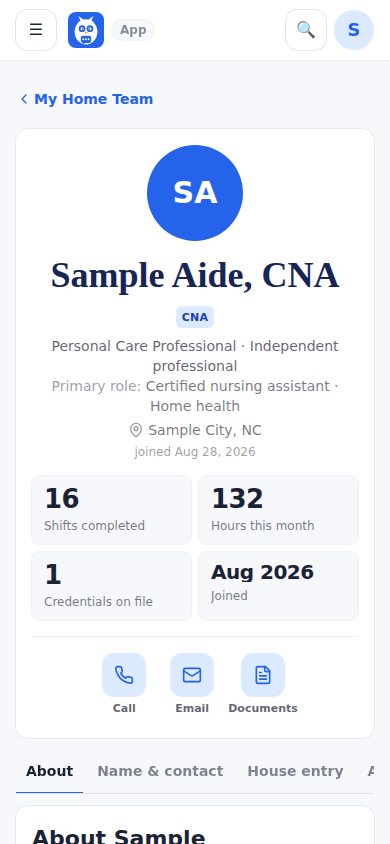
A professional's profile: the name with the credential, the role tag, the stats card and the icon actions.
Was this helpful, or is something out of date? Write to support@expressagain.com and a real person will fix it.

Still need help?

A real person reads every message. Family members are always welcome to write on a patient’s behalf.

Email

support@expressagain.com

We typically reply within one to two business days.

Contact page

Text and in-app

Reply HELP to any of our texts for assistance, STOP to unsubscribe.

Signed in? Send a request from the Help Center inbox and see its status there.

Help Center inbox

If this is an emergency or someone is in immediate danger, call 911 or your local emergency number. This Help Center is for using the app, not for medical advice.