Partly built: part of this depends on a connection or a switch that may not be on for your account yet. The article says which part.
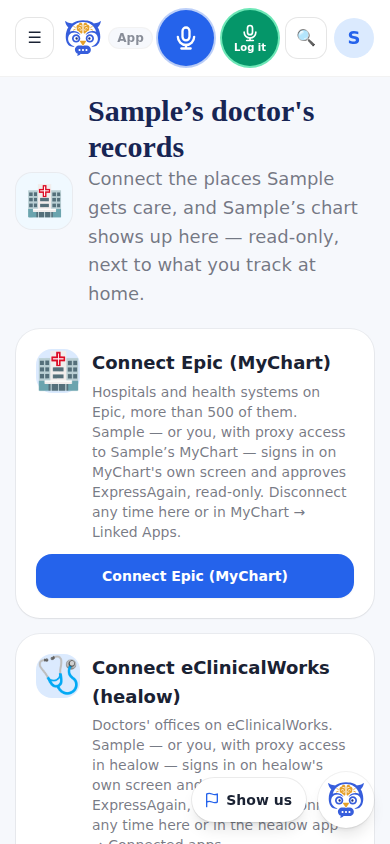
Doctor's Records shows the patient's chart from the hospital and the doctor's office — in one family, the hospitals are on Epic and the practices on eClinicalWorks — read-only, next to what the family tracks at home. They track the patient during a stay; we track things at home. A caregiver-role account connects, the family reads, friends never land here. The connection is patient-authorized, read-only and can be disconnected any time.
The doctor's home summary opens from the records page: what changed since the last visit (the doctor's medication list next to the home list, symptoms, falls, appointments), the readings outside the family's own targets, then the days in detail. Send to the doctor saves it as a PDF and opens the patient portal, where the family attaches it and sends it, so it lands in the chart; see Send the home summary to the doctor. The wallet Medical ID reads the Emergency Plan Card and the profile — Show big for handing the phone to a responder, and Print wallet card at wallet size.
Partly: Epic (MyChart) connects today, at more than 500 Epic organizations, read-only with the patient's approval. The Doctor's Records link, the Medical ID and the Fill from the doctor's records button appear together once Doctor's Records is turned on; if it is not in your menu, ask us.
Five more places a chart can come from: Oracle Health (through the hospital's own patient portal), eClinicalWorks (healow), athenahealth, Medicare claims (Blue Button 2.0) and VA health records. The Interoperability page says which of them connect today; ask us about the others. Each one's Connect card appears on Doctor's Records as that place opens; until then nothing about it shows. See Connect Oracle Health, athenahealth, Medicare or VA.
What it looks like
Screens at phone width, with sample names — no real person’s information.