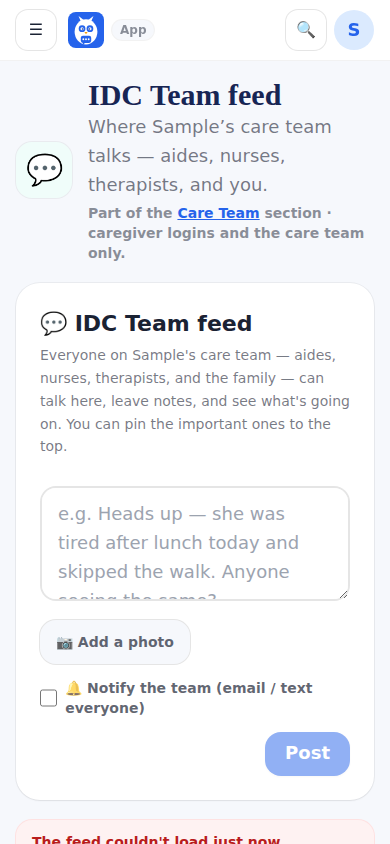
The IDC Team feed is the care team's own conversation: every clinical login and the family's owner and caregiver-role accounts read, post, pin and moderate there. Human posts show in blue; activity rows in ink — a glucose reading, a blood pressure, a medication dose, a step of the day plan ticked — with the initials of who logged it and the time. Chips filter All, People and Activity.
Family-tier members and friends do not see this feed; the server refuses them, not just the menu.
Notes are shown in full. When a meal, a meal offered, a personal-care entry or a symptom was logged with a note, the activity row reads the short line (for example Swelling · legs logged, with the time and who) and the whole note sits right under it, wrapping onto as many lines as it needs. It is never cut off partway, and rows logged before this changed show their whole note too.
Photos: tap Add photos to put up to 6 photos on one post (pick several at once, or add them one by one). Each photo is made smaller on the phone before it is sent. On the feed they show as a tidy grid; tap any one to open it full size and swipe, or use the arrows, to see the others. A post can also carry one video.
Meals today: when a meal is logged with a photo of the plate (see Photos of the plate on every meal), the meal log puts it in the feed by itself, as one Meals today card for that day, never one post per meal. The card is a photo strip of breakfast, lunch, dinner and snacks in clock order, each with the meal and the time and what was eaten; tap one to see it full size, with the meal, the time, the patient's name, what was eaten and who logged it, and swipe through the day. When an after-the-meal photo was taken, the tile says + After and the viewer shows both. The card moves up as new meals are added, and a meal removed from the log leaves the card. People can react and reply on it like any post. It never sends an email, a text or a phone notification. The family's Share meal photos with the care team switch, on the Meals tab of Health Tracking, decides whether the card appears; it is on to start. The card reaches the people this feed reaches: the patient's care team and the family managers (the owner and caregiver-role accounts), never friends and never the agency office.
Shopping notes belong on Menu and Kitchen, not the team feed. When a post reads like one (out of something, running low on, need more, almost out, buy or pick up something, the grocery or shopping list), a line under the box says This sounds like the shopping list, with Put it on the shopping list and Post to the team anyway. It never stops the post. Put it on the shopping list opens one line with the item (edit it as needed) and says which kitchen or Supplies item it found, with Not that one when it picked the wrong one. A professional's item in the kitchen or Supplies is marked out or running low and goes on the list as Added by their name; something the house does not have becomes a suggestion for the family. The family's own goes straight on the grocery list. A medication that ran out is never a shopping note: the line points to Out of medication on Prescriptions instead. Ordinary care notes, like out of breath or out of bed, do not bring up the line.
On a post already in the feed that reads like a shopping note, the family managers see Move to shopping list: it puts the item on the list the same way and, with Also take this post off the team feed ticked, removes the post (the family side can already delete any post).
Staffing notices go privately, not on the team feed. When a professional's post reads like calling out of a shift (for example I won't be able to work today, calling out, running late, I'm sick today, need the day off, can someone cover my shift), a box under the composer says This sounds like a shift notice: Send it privately to the family instead? Nurses and doctors won't see it, and you can offer your shift to the team. Send privately opens I can't make it with the words already in it; Post to the team anyway posts as usual. It never blocks the post, and care notes about the patient (can't make it to the bathroom alone, running low on gloves) do not bring it up. Only professionals see the box; the family's own posts never do. Replies are not checked.
On a professional's post already on the feed, the family managers (the owner and caregiver-role accounts) see Move to private. After one confirmation (Move this to your private Staffing inbox? It leaves the team feed for everyone.) the post leaves the feed for everyone, the same way Delete takes it off, and appears on Staffing notices with its author and time and who moved it.
The badge on a post or a reply names the professional's role from their title first: a CNA, HHA or PCA reads CNA, HHA or PCA with the Home Team's house, and an RN or LPN reads RN or LPN, even when the login joined with another role. The family can correct a login's role itself on the professional's profile: My Care Team, open the profile, Manage, Role on the team.
Step by step
- 1Open Care Team, then IDC Team feed (on the care-team dashboard: Today, then Team feed).
- 2Type a post. To add pictures, tap Add photos and pick up to 6.
- 3Tap Post. Tap a photo on any post to see it full size and swipe to the next.
- 4Tap a photo on the Meals today card to see the day's meals one by one.
What it looks like
Screens at phone width, with sample names — no real person’s information.