ExpressAgain
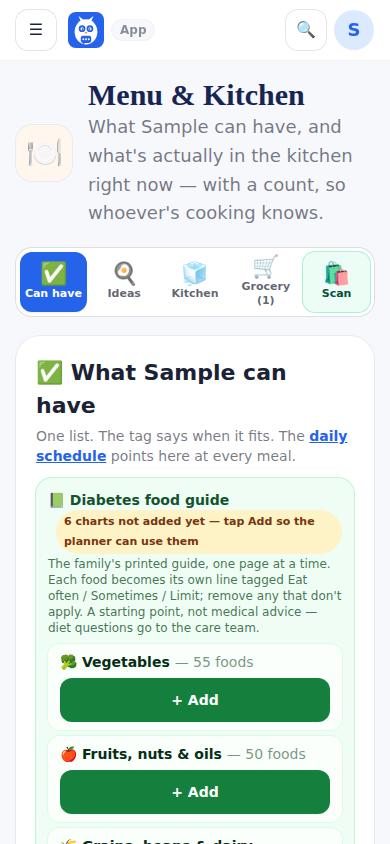
The can-have list (headed with the patient's name, like What Debbie can have) is one list of everything allowed, each line tagged Breakfast, Lunch, Dinner, Snacks or Drinks, with the printed diabetes food guide available one chart at a time (Eat often, Sometimes, Limit, with serving, carbs and calories). Filter chips and a search box sit above it.
What's in the kitchen is a real inventory with a count on hand: scan, picture or type, then how many. Press minus as things get used and plus when you restock; I cooked something puts a homemade dish in the fridge so the next aide knows the taco meat is there; servings count down one at a time. The Meals tab in Health Tracking picks from this list.
Recipe ideas is one tap for two lists — cook now with what is here, and worth a shopping trip with the things to buy. Plan the day builds four meal slots from the kitchen and the can-have list; Yes logs the meal and counts the food down. The grocery list is its own tab.
Single-serve items — K-Cup pods, tea bags, a 6-pack of Glucerna or water, yogurt cups, string cheese — are counted in pieces that each make one serving: a box of 12 pods is one box with 12 pods inside, and the label numbers are per piece. When the barcode or the name says 12 ct, K-Cup, pods or bottles, the confirm card fills in Counted in (pods) and Each one makes (1 cup); the family corrects either on the card or on the item row's Counted in and Each makes boxes. Such an item shows Quick cup: one tap takes one piece off, logs the drink to Health Tracking with its numbers, and offers the add-ons found in the kitchen (Half & Half, creamer, sugar) as separate deductions to tick. The row says how many pieces went out this month and this week and about how many a day, and the grocery list's low warning speaks in pieces (3 pods left).
What it looks like
Screens at phone width, with sample names — no real person’s information.