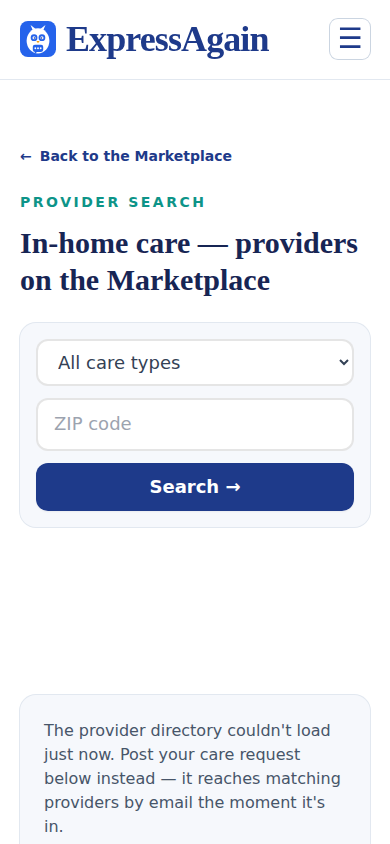
The public Marketplace lets a family search the professionals who have posted a profile, by the kind of care and a ZIP code. Results are real people from the system, never invented; names show as a first name and an initial and contact details stay private until the professional answers a request. Each service (companion care, personal care, dementia care, medication support, post-stroke support, skilled nursing, around-the-clock, end-of-life, respite, meal preparation, homemaking, transportation, comprehensive home care) has its own page.
Clinician type is the second choice beside Care type, on the Marketplace page, on Find home care providers and on Matched professionals (Find a Team Member): Registered nurse (RN), Licensed practical nurse (LPN / LVN), Nurse practitioner (NP), Wound care nurse, Certified nursing assistant (CNA), Personal care assistant (PCA / HHA), Medical assistant (MA), Phlebotomist, EMT / paramedic and Therapist (PT, OT, speech). A professional counts as a type by the role they chose when they joined, the credential letters on their login, their care-team discipline or a credential of that type on file, never by a name; a wound care nurse who is an RN shows under both. The types a professional counts as appear as small chips on their card. Choosing a clinician type narrows the results to those professionals only; Any clinician type shows everyone.
Who is the third choice, on Find home care providers and on Matched professionals: Everyone, Independent professionals, or Agencies and facilities. Every professional says which they are when they join, and the card wears it as a badge, Independent professional or Agency.
What a card shows. The photo of an independent professional or the logo of an agency, when one is on their profile; without one, the first letter of the name on a plain disc, never a stock picture. The name, masked. The role with the credential letters from their login and the current credentials on file, for example Certified nursing assistant (CNA) · CPR. The city, state and ZIP code, such as Columbia, SC 29201, or the state's name and the ZIP until a city is typed; never a street address. How far they go: Travels up to 60 miles for an independent professional, or Serves: Columbia, SC · Charleston, SC for an agency or facility with several locations. The rate when they gave one, the services and a line about themselves. A card with an empty spot means the professional has not filled that part in yet; the public profile page shows the same card with the written About, education and experience when they chose to share them. Under the card, two buttons: Learn more drops down the services as boxes to tick, each with a one- or two-line blurb (ours until the professional writes their own on Provider Home), and a Submit your care request now button that opens the request with the ticked services filled in as You are asking about; then the line about them, the local and travel rates, how far they go, the credentials on file, Background check: on file or not on file yet, and Reviews: none yet, with a link to the full profile; Request care drops down the request form in the same box, with the schedule as boxes to tick (weekday days, weekday evenings, weekend days, weekend evenings, overnight, live-in) because a family may need more than one. The rate reads Rate over the hourly amount, written per hour.
The public profile, opened from a card's name or from Open the full profile, is about that one professional and nothing else. The head comes first: the photo or logo (the first letter on a plain disc without one), the introduction video when there is one, the name, the badge Independent professional or Agency, the Featured tag when the placement is running, the city, state and ZIP code with how far they go, the stars (five empty stars and No reviews yet until a family reviews), Background checked when a check is on file, Families cared for with the real count and the requests answered (or New on ExpressAgain), the rate with the years of experience beside it (the starting rate per hour, then the years, each half only when it is set), the role with the credential letters, and the Request care button. Under the gray line, ten tabs, each showing only its own section: About (the words they wrote, the quote, Specialties, Works with, Additional details such as Non-smoker or CPR certified when true, their work history, and an agency's Meet the agency on video card); Services (the services as boxes to tick, each with its blurb, and Submit your care request now); Credentials (the role line and the credentials on file with their state and expiry, or No credential copy on file); Rates (the hourly rate, the starting rate and Pay by distance when set); Availability; Education (the schools and degrees they listed, or the license and credential line when none); Languages; Vaccinations (one line in the professional's own words, or Not listed); Safety (Background check: on file with the month, or not on file yet, the trust lines that are true, a note that a family orders or records a screening from Care Team after hiring, and the small Report this profile link that sends a reason and a few words to the ExpressAgain team only); and Reviews. A tab with nothing filled in says so in one line and asks you to put the question in your request; nothing is invented. Without JavaScript every section shows stacked, and the tab names jump to them.
Reviews are real only. The profile's head shows five stars filled to the average with the count, or five empty stars and No reviews yet; a tap on them opens the Reviews tab, which carries the average to one decimal and the count when a family has left at least one, and No reviews yet otherwise; a card shows the stars with the average and the count only when there are reviews, and the Learn more panel reads Reviews: none yet until there are. Each review shows the family's first name and an initial, the month and year, the stars and the words. Leave a review appears only to a signed-in family account owner who worked with that professional through ExpressAgain: the professional's login is on the family's team, or the professional answered a care request the family posted. One review per family; saving again replaces it. Anyone else sees one line saying who can review. The ExpressAgain team can hide a review with a reason; it is never deleted.
The Availability tab shows what the professional set on Provider Home: Full-time, Part-time or Full-time or part-time; a weekly grid, Monday to Sunday across and Morning, Afternoon, Evening and Overnight down, with a filled cell wherever the hours they set for that day touch that part of the day or a schedule block they ticked under Pay by distance covers it (weekday days fill the weekday mornings and afternoons, overnights fill every overnight, 24/7 or live-in fills everything); the schedule blocks themselves; the hours for each weekday, such as Monday 7:00 AM to 3:00 PM; and, folded closed, a calendar of this month and next with the days they marked as not available crossed out, with Last updated and the day. A profile with nothing set reads Availability not listed.
Request care has its own place, never inside the profile. On the profile page the Request care button in the head, and Submit your care request now under the Services tab, scroll to a separate section under the profile, Tell them what you need, with the form in its own card and the ticked services filled in as You are asking about. Under that section, folded closed, Other professionals near here lists up to four other live profiles in the same state that share at least one service, nearest first, each with the photo or initial, the name, the city, state and ZIP code, the starting rate and the years of experience when known.
The profile beside the results. On a desktop or laptop screen, Learn more opens the full profile to the right of the results, like a reader's pane: the same head and tabs, while the results stay on the left in one column with the chosen card outlined. Close returns to the full grid; Open full page opens the same profile on its own page; a new search closes it. Request care on a card, the Request care button in the profile's head, or Submit your care request now under its Services tab replace the profile with the request panel in the same place: Back to the professional's profile at the top, Close and Open full page beside it, then Tell them what you need and the form with the professional and the ticked services already filled in. The address bar carries the choice, so a shared link opens the same panel. On a phone, Learn more drops the details down inside the card as before, and a shared link to a chosen profile or request shows it above the results. A small Previously viewed tag on a card means this browser opened that profile before, in the pane or on its own page; the list stays in the browser only and reaches no one.
Saving a provider. Every card carries a small Save heart at the top right of its tag row, and the profile carries one in its head, at the right of the name, in the pane and on its own page. Saving needs an account: signed out, a tap on the heart saves nothing and opens a small sheet inside the card, Save providers to your list, with two doors, I'm a patient or family (the family sign-up) and I'm a professional or clinician (the care-team sign-in), and a Sign in link, each landing back on the same page with that provider saved once you are in. Signed in as a family account or with a professional's own login, the heart saves the profile and reads Saved; a second tap unsaves it. The saved profiles are on the Saved providers page, linked at the top right of Find home care providers as Saved providers with the count, and from Marketplace Home in the app; each is the same card as the search, with Saved and the day, Last seen and the day, and the heart reading Unsave, which drops the card. One family account shares one list, a professional's login has its own, and another list is never shown. For a signed-in family, a card and the profile's head also carry Last seen and the day the family last opened that profile, in the pane or on its own page, recorded on the server, so it follows the family to any device; a visitor keeps the browser-only Previously viewed tag.
In the Match on distance, pay, tasks, credential and schedule fold, Nurse supervision is a choice beside How care is arranged: None in place, or A registered nurse delegates and supervises the medication or nursing tasks. In some states an aide or a CNA may do a medication task only under a registered nurse's delegation, so choosing the second widens the match to the credentials your state allows that way.
Featured providers. A card with a small Featured tag at its top-left belongs to a professional or agency whose featured placement is running: they pay ExpressAgain for that placement, and it puts them first in the results, the way a sponsored listing works on a shopping site. The tag's hover text says so, and so does the line read to a screen reader. Featured cards come first on Find home care providers and on Matched professionals (there the sub-line reads Featured professionals first, then best fit); after them the order is the usual one: on the plain list, the order professionals joined in; on Matched professionals, the best fit first. The tag changes nothing else on the card: the photo, the role, the credentials and the background check line are the professional's own, exactly as for everyone else, and nothing on a featured card is invented. The same tag shows under the badge on their public profile.
The experience line and the video. Under the place on every card, one line says what the professional has done here: Worked with 3 families on ExpressAgain · 5 requests answered; the public profile's head says the same as Families cared for: 3 · 5 requests answered. The families are the family teams the same person holds a live seat on, counted from the app; the requests are the open care requests they answered on the board. No family and no patient is ever named, and nothing is estimated: a professional with neither reads New on ExpressAgain. When a professional has added a short introduction video, the card wears a small Video tag beside the badge, and the public profile's head carries the video under Meet, above the Request care button. It plays only when you press play, with the sound off until then.
A family can also post an open care request; professionals see it on the Open Care Requests board with the family's name masked, and a response delivers the professional's message and contact details to the family by email.
Meet an agency on video. An agency's profile carries a card under its About tab, Meet the agency on video, with one button, Ask for a video call. The form asks for your name, your email, a mobile phone if you want a text an hour before, up to three times that suit you and one line about what you want to talk about; it asks for nothing medical. The agency confirms one of the times (or proposes another) and you get an email with the time, a button that opens the video room and a calendar file. The room opens 15 minutes before the start; the call runs on Jitsi Meet in your browser with nothing to install and no account, and it is not recorded. Only an agency's profile has this card.
Where families are asking and nobody is listed. Every request is a lead, even one posted in a ZIP area where no professional offers that care yet. When a request is saved, the professionals in the same 3-digit ZIP area are emailed; when there are none, the request is marked as having reached nobody, the family's receipt says the request is live on the board, and ExpressAgain is told which state has no professionals yet, so it can recruit there: the date, the care type, the ZIP area as three digits, the schedule and the pay offered, with the family's first name only. The family's email and phone are never shown there.
About the patient. The request form's last group, under the heading Start the care plan, is the first piece of the care plan: Patient's first name (a first name is fine), Age, Diagnosis or the reason for care, Who they are (their life and work, what a good day looks like, what matters to them) and Anything else. Every field is optional. The professional who answers reads it before anything else, so it is written for them: the name and age on one line, the reason for care, who the patient is, then the rest. These are health details, so they go only to the one professional the request was sent to (in their email and under Requests sent to you on Provider Home) and to the founder's inbox. They never appear on the Open Care Requests board, in the email that goes out to every matching professional, or in the family's own receipt; those carry the care type, the area and the schedule only. A signed-in owner whose public page is on also sees Share the page with the professional, ticked to start: the request then carries the page's address, read from the owner's own page on the server, and the professional's email and the request under Requests sent to you on Provider Home show About the patient with the link. Untick it, or keep the page off, and nothing is added.
The request creates your account. Sending a care request creates a free ExpressAgain account for the email on the request when that email has none. The form says so under the contact fields, Sending this request creates your free ExpressAgain account so you can track it, followed by the same privacy and terms sentence the sign-up page shows, with links to the Privacy Policy and the Terms of Service. After sending, the thank-you reads We created your free account so you can track this request and names the email to check, with a Sign in button. The email, Your ExpressAgain account is ready, carries an Open my account button that signs you in with no password; the link works once and is good for seven days. To sign in with a password later, tap Forgot your password? on the sign-in page and choose one, or use Email me a sign-in link there at any time. When the email already has an ExpressAgain account, the request is linked to that account and the thank-you reads Sign in to track this request. A request sent while signed in is saved to that account, and the thank-you offers Your care requests. The account is created on the server from the request itself, only after the spam checks pass, and nothing but those two lines is ever said about an email.
Your care requests. Signed in, Marketplace Home (the Find HCT group) carries a section titled Your care requests, closed to one line until opened, for example 2 care requests sent, the newest on Oct 10, 2026. Open, it lists each request the account sent, newest first: the day, the care type with the schedule and the pay offered, who it went to (Sent to and the professional's masked name for a request sent to one professional, Sent to 4 professionals near the ZIP for an open request, or No professional listed near the ZIP yet when the request reached nobody and sits on the open-requests board), and the status: Open with the number of answers from professionals, or Closed. The list is read-only and shows the signed-in account's own requests only, matched by the account, never by email.
What it looks like
Screens at phone width, with sample names — no real person’s information.